


هدست بلوتوث هوکو W55 پلاس
هدفون بلوتوث هوکو مدل W55 Plus ANC با قابلیت کاهش نویز
مدل: W55 پلاس
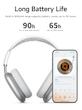
هدفون بلوتوث با قابلیت کاهش نویز ANC برای ورزش در فضای باز و موسیقی با 90 ساعت زمان استفاده طولانی و صدای با کیفیت بالا
1. مقدمه
از انتخاب هدفون بلوتوث HOCO W55 Plus ANC Noise Reduction متشکریم. این هدفونها به گونهای طراحی شدهاند که با فناوری پیشرفته حذف نویز فعال (ANC)، عمر باتری طولانی و راحتی در استفاده، تجربه صوتی فوقالعادهای را ارائه دهند. این دفترچه راهنما شما را در راهاندازی، عملکرد و نگهداری هدفون جدیدتان راهنمایی میکند.

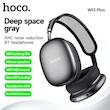
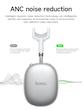
شکل ۱: هدفونهای HOCO W55 Plus ANC (خاکستری تیره)

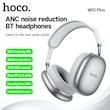
شکل ۲: هدفون HOCO W55 Plus ANC (نقرهای)
2. محتویات بسته
لطفا موارد زیر را در کادر مربوطه تیک بزنید:
هدفون بلوتوث هوکو W55 Plus ANC
راهنمای کاربر (این سند)
کابل شارژ (USB Type-C)
آداپتور صوتی جک 3.5 میلی متری
3. مشخصات

شکل ۳: نمای کلی اطلاعات محصول
ویژگی | مشخصات |
|---|---|
مدل | W55 پلاس |
نسخه بلوتوث | ۵.۴ (تراشه JL7006F8) |
ظرفیت باتری | 800 میلی آمپر ساعت |
زمان شارژ | تقریبا 2 ساعت |
زمان پخش موسیقی | تا ۷ ساعت (ANC خاموش)، ۴ ساعت (ANC روشن) |
زمان آماده به کار | بیش از 200 ساعت |
مواد | ای بی اس |
قطر درایور | 40 میلی متر |
پاسخ فرکانس | 20 - 20000 هرتز |
محدوده امپدانس | تا 32 اهم |
حداکثر برد بی سیم | 10-20 متر |
ارتباط | بی سیم (بلوتوث) |
اتصال دهنده ها | تایپ سی (شارژ)، جک ۳.۵ میلیمتری (صدا) |
سبک | بالای گوش |
ویژگی ها | حذف نویز فعال، میکروفون داخلی، کابل جداشدنی، ضد آب، عایق صدا، دستیار صوتی، پشتیبانی از اپلیکیشن، پشتیبانی از کارت حافظه |
ابعاد محصول | 195 × 185 × 84 میلی متر |
وزن محصول | 198 گرم |

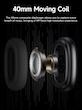
شکل ۴: نمودار بلندگو با سیمپیچ متحرک ۴۰ میلیمتری
4. راه اندازی
۴.۱ شارژ کردن هدفون
قبل از اولین استفاده، هدفون خود را کاملاً شارژ کنید. کابل شارژ USB Type-C ارائه شده را به پورت شارژ هدفون و سر دیگر آن را به یک منبع تغذیه USB (مثلاً کامپیوتر، آداپتور دیواری) وصل کنید. چراغ نشانگر شارژ، وضعیت شارژ را نشان میدهد. شارژ کامل تقریباً 2 ساعت طول میکشد.
4.2 روشن/خاموش
روشن کردن: دکمه پاور را به مدت ۲ ثانیه فشار دهید.
برای خاموش کردن: دکمه پاور را به مدت ۲ ثانیه فشار دهید.
4.3 جفت شدن بلوتوث
مطمئن شوید که هدفون خاموش است.
دکمه پاور را به مدت ۳ ثانیه فشار دهید تا چراغ نشانگر چشمک بزند که نشاندهنده حالت جفتسازی است.
در دستگاه خود (گوشی هوشمند، تبلت و غیره)، بلوتوث را فعال کنید و دستگاههای موجود را جستجو کنید.
از لیست دستگاههای یافتشده، «HOCO W55 Plus ANC» را انتخاب کنید.
پس از اتصال، چراغ نشانگر تغییر میکند و یک تأیید صوتی خواهید شنید.
ویدیوی ۱: نمایش محصول که ویژگیها و جفتسازی بلوتوث را نشان میدهد.
4.4 تغییر زبان
وقتی هدفونها جفت نشدهاند، برای تغییر بین صداهای سریع چینی و انگلیسی، روی کلید تابع (معمولاً دکمه پاور) دوبار کلیک کنید.
5. دستورالعمل های عملیاتی
5.1 کنترل
این هدفونها دارای یک دکمه چرخشی و یک دکمه پاور برای کنترل آسان هستند:

شکل 5: نمای کلی کنترلهای هدفون

Figure 6: Detailed Control Functions
پخش/مکث: Single click the knob button.
حجم -/+: Turn the knob button left for volume down, right for volume up.
آهنگ قبلی: Triple click the knob button.
آهنگ بعدی: Double click the knob button.
پاسخ/قطع تماس: Single click the knob button.
رد تماس: Long press the knob button.
احضار دستیار صوتی: Long press the knob button for 2 seconds.
5.2 حذف نویز فعال (ANC)
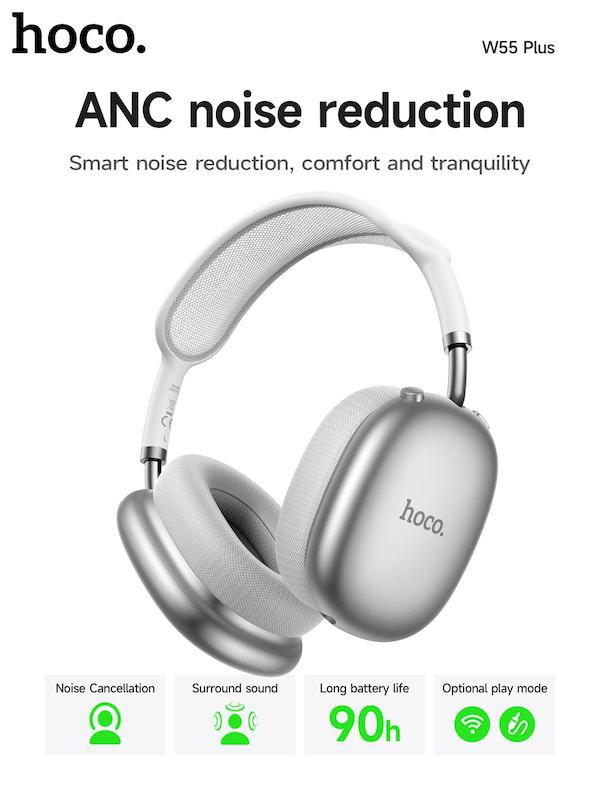
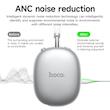
The HOCO W55 Plus features intelligent dynamic noise reduction technology to effectively isolate ambient noise, allowing for a more immersive listening experience. Refer to the product's specific controls for activating/deactivating ANC if a dedicated button is present (not explicitly detailed in provided materials, typically integrated with a function button).

Figure 7: ANC Noise Reduction Effect
۵.۴ حالتهای پخش چندگانه
The headphones support multiple playback options:
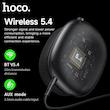
حالت بلوتوث: Connect wirelessly to your device via Bluetooth 5.4.
حالت AUX: Use the provided 3.5mm audio cable to connect to devices without Bluetooth capability.
حالت کارت حافظه: Insert a compatible memory card to play audio directly from the headphones (if supported by your specific model).

Figure 8: Wireless 5.4 and AUX Mode
6. تعمیر و نگهداری
تمیز کردن: برای تمیز کردن هدفون از یک پارچه نرم و خشک استفاده کنید. از مواد شیمیایی قوی یا مواد ساینده استفاده نکنید.
ذخیره سازی: When not in use, store the headphones in a cool, dry place. The earcups can be rotated 90 degrees for more convenient storage and portability.
مراقبت از باتری: To prolong battery life, avoid exposing the headphones to extreme temperatures. Charge the battery regularly, even if not in frequent use.
نگهداری از گوشی: The earcups are made with memory foam and breathable material for comfort. Ensure they remain clean and dry.

Figure 9: Headphone Adjustments and Comfort Features
7 عیب یابی
هدفون روشن نمی شود: Ensure the battery is charged. Connect the charging cable and allow it to charge for at least 10 minutes before attempting to power on again.
نمیتوان با دستگاه جفت شد: Make sure Bluetooth is enabled on your device and the headphones are in pairing mode (flashing indicator light). Move the headphones closer to your device and away from other wireless interference.
صدا ندارد یا صدایش کم است: Check the volume levels on both the headphones and your connected device. Ensure the headphones are properly connected via Bluetooth or AUX cable.
ANC به طور مؤثر کار نمیکند: Ensure the earcups form a good seal around your ears. ANC works best with consistent, low-frequency noise.
اتصال متناوب: Ensure your device is within the 10-20m wireless range. Avoid physical obstructions between the headphones and your device.
8. نکات کاربر
تناسب راحت: Adjust the telescopic headband and rotate the earcups to find the most comfortable fit for extended listening sessions. The memory foam earcups are designed for pressure-free wear.
لذت طولانی مدت: With up to 90 hours of battery life, these headphones are ideal for long trips or extended use without frequent recharging.
صدای فراگیر: پیشی بگیرtage of the 40mm speakers and HiFi HD sound for a rich and detailed audio experience.
محیط آرام: Utilize the Active Noise Cancellation (ANC) feature in noisy environments to focus on your audio.
کنترل آسان: The intuitive rotary knob allows for quick adjustments to volume, track selection, and call management.
9. گارانتی و پشتیبانی
For warranty information or technical support, please contact the retailer or manufacturer directly. Keep your proof of purchase for any warranty claims